Thursday, November 14, 2013

iOS 7.0.4 Security Update

--


Apple has released the iOS 7.0.4 update. As with the previous three iOS 7 updates, this one patches a critical security hole. This update specifically patches the App Store app:
APPLE-SA-2013-11-14-1 iOS 7.0.4
iOS 7.0.4 is now available and addresses the following:

App Store 
Available for:  iPhone 4 and later, iPod touch (5th generation) and later, iPad 2 and later.

Impact: App and In-App purchases may be completed with insufficient authorization.

Description:  A signed-in user may be able to complete a transaction without providing a password when prompted. This issue was addressed by additional enforcement of purchase authorization.

CVE-ID
CVE-2013-5193
IOW: Sounds like another kids-gone-wild-buying-stuff flaw in iOS. I'm glad that's locked again!

:-Derek


MacRumors Forum Accounts Hacked!
Change your password ASAP

--

In case you haven't heard, this week it was revealed that ~860,000 account passwords were hacked from the MacRumors.com forum website. Therefore: Change your MacRumors password immediately! And of course, use unique passwords at each and every website.

There are two dangers when website accounts are hacked:

1) The hackers will mess over your account at the source website. They can pretend to be you, say anything and do anything as you. They can change your password and lock you out.

2) If you were as dopey as I used to be and used the same ID and password at different websites, the hackers can get into and mess over those accounts as well!

Here are some articles relevant to the MacRumors.com hyper-hack:

MacRumors Forums: Security Leak
Tuesday November 12, 2013 2:48 pm PST by Arnold Kim
Yesterday, the MacRumors Forums were targeted and hacked in a similar manner to the Ubuntu forums in July. We sincerely apologize for the intrusion, and are still investigating the attack with the help of a 3rd party security researcher. We believe that at least some user information was obtained during the attack.
In situations like this, it's best to assume that your MacRumors Forum username, email address and (hashed) password is now known. What this means for you, if you have a MacRumors Forums account, is the following:  
1. Change your password on our forums. If you have any problems, please contact us.  
2. If you used the same password on any other site, change it there also. . . 
Hack of MacRumors forums exposes password data for 860,000 users
by Dan Goodin - Nov 12 2013, 11:05pm EST
Readers who had MacRumors accounts would do well to follow Kim's advice and immediately change login credentials that use the same or similar password. They should also be vigilant of phishing attempts, since their user names and e-mail addresses have also been exposed.
MacRumors hacker who took 860,000 passwords speaks: “We’re not terrorists”
No plans to mass compromise accounts on other sites, post says.
by Dan Goodin - Nov 13 2013, 3:30pm EST
"We're not logging in to your gmails, apple accounts, or even your yahoo accounts (unless we target you specifically for some unrelated reason)," the user known simply as Lol wrote. "We're not terrorists. Stop worrying, and stop blaming it on Macrumors when it was your own fault for reusing passwords in the first place."
He continued: "Consider the 'malicious' attack friendly. The situation could have been catastrophically worse if some fame-driven idiot was the culprit and the database were to be leaked to the public."
In subsequent posts here and here, Lol expanded on the thinking behind the hack. "Outside of this hobby, *cough*, I do partake in whitehat activities and try to contribute to some open source projects etc. It builds quite the resumé." The MacRumors breach, Lol added, was taken on "to test myself. I never defaced the site, I never bragged about it anywhere, I just got in and got out."
Are hackers usually arrogant and superior in tone like this? Oh yes. But setting aside the overcompensation-for-personal-insecurity-issues, hackers are a good thing. This hacker is a self-proclaimed 'white hat', meaning that his aim is to test via hacking then reveal the security flaw to the creators of the source software or website.


Here is one description of a white hat hacker:

http://en.wikipedia.org/wiki/White_hat_hacker
The term "white hat" in Internet slang refers to an ethical computer hacker, or a computer security expert, who specializes in penetration testing and in other testing methodologies to ensure the security of an organization's information systems. Ethical hacking is a term coined by IBM meant to imply a broader category than just penetration testing. White-hat hackers may also work in teams called "sneakers", red teams, or tiger teams.
Despite what this guy says, I'd get busy changing your password at MacRumors.com, and anywhere else you used the same password. Here's where to change your MacRumors password:

http://forums.macrumors.com/profile.php?do=editpassword

White Hat ≈ Hacker
Black Hat ≈ Cracker

I recently heard Leo Laporte of TWiT and Steve Gibson of Gibson Research Corporation (GRC) speculate that the terms 'Hacker' and 'Cracker' were dead, essentially replaced by 'White Hat' and 'Black Hat'. I've seen no evidence of this assertion. Within the computer community, all four words retain significant descriptive meaning. Despite drawbacks using either set of terms, I don't expect any of them will disappear from the technology vocabulary.

:-Derek


Saturday, October 26, 2013

Sandboxing Flash:
Safari 7 Is Adobe's Nanny

--

Adobe has been very naughty. Nanny is not pleased. So it's off to isolation in the sandbox with Adobe Flash, that retrobate obnoxious-ware of the Internet that has been more dangerous than useful.

Good news: Apple has joined the nanny crew and sent obstreperous, unreliable Flash off the sandbox in Safari 7.

As per the SANS Institute via NewsBites Volume 15 Number 083:
Adobe Flash Player is now sandboxed in Apple's Safari browser. Adobe has already released sandboxed versions of Flash for Firefox, Chrome, and Internet Explorer. When software is sandboxed, it is granted limited privileges on a system; it may be prohibited from writing to a storage device or altering data in memory. The sandboxed version of Flash for Safari is for machines running OS X 10.9 Mavericks.
SANS also provides a couple links with details about the change:


What's Sandboxing?

Let's see what Wikipedia says:
The sandbox typically provides a tightly controlled set of resources for guest programs to run in, such as scratch space on disk and memory. Network access, the ability to inspect the host system or read from input devices are usually disallowed or heavily restricted. In this sense, sandboxes are a specific example of virtualization.
IOW: It's a safe space for isolating bad actors from good actors on your computer.

Note, however, that Java was supposed to be 'sandboxed'. That didn't work thanks to Oracle infesting it with code that leaped outside of the sandbox, directly into open computer space. Therefore, it's important to be wary of anything labeled as 'sandboxed' that may in fact be leaking sand into places you don't want it to go. Time will tell if the Flash 'sandbox' is actually safe or not.

And no, sorry but this sandboxed version of Flash does not sandbox on earlier versions of Apple's Safari. It is exclusively supported in OS X Mavericks 10.9 and above.

The best way to avoid naughty Flash from putting your computer at risk is to make certain it is up-to-date:


--

Friday, September 27, 2013

'I'm not dead yet!'

--

[No graphic here because Google borked]

For those concerned: I'm working through a lot of important processes at the moment that require my diversion from keeping the Mac-Security blog up-to-date. My apologies.

However, I've hopefully provided all the required resources in my 'Friends of Mac-Security' list at the right of this page. The only other items I'd add would be to regularly check for updates from Adobe and Java updates from Oracle. Thankfully, Apple automatically and reliably alerts users to updates.

Quick notes:
• There have be a few recent species of Mac malware crawling out of the malware rat holes. You can read about them at 'The Secure Mac' linked in the 'Friends of…' list at the right.
• Adobe, Oracle and Apple have provided a huge slew of critical security updates over the past two weeks.
• Also of vital note, the Touch ID system on the iPhone 5S has been 'cracked' or circumvented by a variety of methods. IOW: It ain't perfect. In fact, it met the widespread expectation of not being much of an improvement over older fingerprint scanners. I can't personally recommend using it as anything but part of a multi-factor authorization system. Apple has kind-of, sort-of done that by integrating the requirement of a passcode for certain user behaviors and after 5 failed attempts at logging in with a fingerprint. I'll write in depth about this subject at another time.

Thanks for checking here for new posts! I expect I'll get the writing engine back up and running this weekend with a summary of what's new over the last few weeks.

:-Derek

[No graphic here because Google borked]

--

Saturday, August 31, 2013

Java 6 UNSAFE At Any Version:
*Shoot On Sight!*
It's Java 7 Update 25 or nothing.

--

The Java experience over the last couple years has been like living in a horror movie. Once Oracle got their hands on Java, they ruined it. Shame on you Oracle! I hate you.

This past week, Apple used their XProtect technology, found in OS X 10.6.8 onwards, to block all versions of Java earlier than 6u51. Here is Apple's security announcement from Thursday:
APPLE-SA-2013-08-29-1 OS X: Java Web plug-in blocked
Due to multiple security issues in older versions, Apple has updated the web plug-in blocking mechanism to disable all versions prior to:

Java 6 update 51
Java 7 update 25

More information on Apple-provided updates is available at
http://support.apple.com/kb/HT5797

Information on blocked web plug-ins will be posted to:
http://support.apple.com/kb/HT5660
OK. Except that's not good enough! According to Information Week, there is NO safe version of Java 6:

Hackers Target Java 6 With Security Exploits 
Mathew J. Schwartz | August 26, 2013 11:35 AM | Information Week
Warning to anyone still using Java 6: Upgrade now to Java 7 to avoid being compromised by active attacks.

That alert came via F-Secure anti-malware analyst Timo Hirvonen, who reported finding an in-the-wild exploit actively targeting an unpatched vulnerability in Java 6 following the recent publication of related proof-of-concept (POC) attack code. The Java runtime environment (JRE) bug (CVE-2013-2463), was publicly revealed when Oracle released Java 7 update 25 in June 2013, which remains the most recent version of Java. . . .

The safe bet now is to expect no new Java 6 updates. Oracle's Java 6 download page reads: "Updates for Java 6 are no longer available to the public. Oracle offers updates to Java 6 only for customers who have purchased Java support or have Oracle products that require Java 6."

According to statistics released in March 2013, at least 47% of all Java users in the United States were still running Java version 6.

What risk do Java 6 users now face from the new vulnerability that's being exploited? According to vulnerability information provider Secunia, the bug could be "exploited by malicious local users to disclose certain sensitive information, manipulate certain data, and gain escalated privileges and by malicious people to conduct spoofing attacks, disclose certain sensitive information, manipulate certain data, cause a DoS (denial of service), bypass certain security restrictions, and compromise a vulnerable system."
CONCLUSION:

If you are running ANY version of the JavaAppletsPlugin.plugin that is older than version 7u25, TRASH IT! Then restart any web browser you may have open.

Not kidding here folks! You do not want to get PWNed.

Here is where to find your Java plugin on OS X:

/Library/Internet Plug-ins/JavaAppletPlugin.plugin

Check the version number of the plugin via Get Info (⌘-I). If you see anything except "Java 7 Update 25", then doom shall reign upon your computer! You have been warned.


BUT GET THIS!

As per Mathew J. Schwartz' article at Information Week:
While Java 6 is now under the gun, the latest version of Java 7 also sports at least one serious unpatched vulnerability. Fortunately, however, no technical details about that vulnerability have been publicly released. The bug, dubbed "issue 69," was discovered by veteran Java bug hunter Adam Gowdiak, CEO of Polish research firm Security Explorations, and reported to Oracle on July 18, 2013.
IOW: There is already a known security hole in even Java 7 Update 25.

Therefore, even if you MUST use Java on the Web, the very safest thing to do is to: 
Just Turn Java OFF.

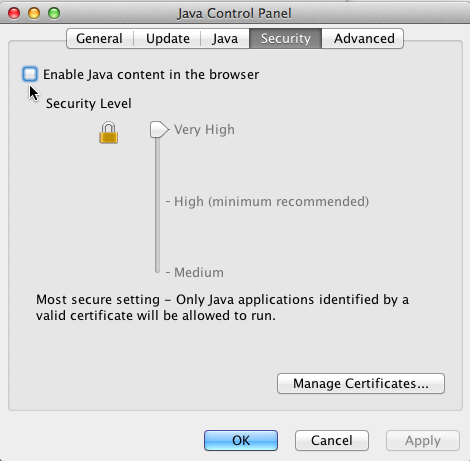
Here is where Oracle now lets you, at long last, turn Java off inside its 'Control Panel' on OS X:


Here's how to get there:

1) Open 'System Preferences...' from the Apple Menu.

2) If you have Java 7 Update 25 installed, you'll see the 'Java' System Preferences button in the bottom 'Other' section of the window. CLICK IT.

3) The 'Java' Preferences pane opens, except it then insists upon running its 'Java Control Panel' in Java as a separate window. (o_0)

4) Click on the 'Security' tab. That will bring up the interface pictured above.

5) If you don't already have the 'Security Level' jammed up to 'Very High', do that FIRST. (You do NOT want it set any lower unless you are at a specifically known safe web page. Of course remember to jam it back UP to 'Very High' again BEFORE you leave that specific web page).

6) Then check OFF the box near the top that is labeled "Enable Java content in the browser". IOW: There should be NO check mark in that box, as seen in the interface pictured above. I have the cursor in the picture pointing at the box.

7) Click the 'Apply' button on the bottom right of the window.

8) Click the OK button. The Java Preferences will close.

What a PITA.

Yes, Apple has very kindly and wisely provided Safari v6.0.5 and higher that automatically stops Java from working on web pages without specific user approval. What a great feature! But I'm providing the instructions above for those who wish to be extra safe. That means you the user take the extra step to make certain no Java malware is going to be able to attack your machine. Consider it paranoia if you will. But this added safety, short of removing the Java plug-in entirely, is available for you to use. It's what I'm using on my Macs.

Meanwhile, when the current known security hole in Java 7u25 begins being exploited in the wild, watch for yet-another Java security update!

Did I mention that I hate you Oracle? :-P


--

Thursday, August 29, 2013

The Safe Mac's Malware Dictionary

--

My net bud/colleague Thomas Reed has published a Malware Dictionary at his website, The Safe Mac. You can access his Malware Dictionary here:

The Safe Mac : Malware Dictionary

Here's a list of terms featured in Thomas's Malware Dictionary:

adware
backdoor
black hat hacker
bot
botnet
click fraud
command-and-control server
cross-site scripting
definitions
denial-of-service (and distributed denial-of-service)
drive-by download
dropper
exploit
false positive
hacktool
heuristics
in the wild
keylogger
malware
on-access scanning
on-demand scanning
payload
phishing
proof of concept
PUA
ransomware
RAT
rootkit
signatures
spyware
trojan
variant
virus
vulnerability
watering hole
white hat hacker
worm
zero-day

I've added a link to The Safe Mac : Malware Dictionary on the right side of the page under Friends of Mac-Security.


Wednesday, August 28, 2013

iOS (and Android) Security Leaks Uncovered

--

Dan Goodin, one of the reliable writers at Ars Technica, has posted an article discussing an academic paper published by scientists at Microsoft Research and Indiana University. It's well worth a read:

iOS and Android weaknesses allow stealthy pilfering of website credentials
Scientists call on Apple and Google to mitigate "origin crossing" attacks.
Both OSes fail to ensure that browser cookies, document files, and other sensitive content from one Internet domain are off-limits to scripts controlled by a second address without explicit permission....
. . .
"Our research shows that in the absence of such protection, the mobile channels can be easily abused to gain unauthorized access to a user's sensitive resources," the researchers—who besides Wang, included Rui Wang and Shuo Chen of Microsoft and Luyi Xing of Indiana University—wrote. "We found five cross-origin issues in popular [software development kits] and high-profile apps such as Facebook and Dropbox, which can be exploited to steal their users' authentication credentials and other confidential information such as 'text' input. Moreover, without the OS support for origin-based protection, not only is app development shown to be prone to such cross-origin flaws, but the developer may also have trouble fixing the flaws even after they are discovered."
(Bolding above mine).

From my POV, it has been known for years that using iOS meant a restriction on user-added security. Therefore, for example, you are being tracked over the Internet using most iOS web browsers. Whereas, I have total control over Tracking Cookies on my Macs. This means, your privacy as well as security is being compromised whenever you're on iOS, as opposed to the added security measures possible on OS X.


But what's discussed in the article goes to a much deeper point where even the iOS SDK, via Xcode, is instantiating these security flaws into developer applications. That's very bad and means this problem is not going to be solved simply by an iOS update. Xcode has got to be upgraded, then all the applications that have instantiated the security flaw code will have to be recompiled and redistributed in updates.


As ever, I'm grateful to researchers who uncover these problem. This isn't another memory management mess. It's something new to me and required a couple readings to understand. I expect we'll be hearing more about this problem as developers sort out whether their apps are vulnerable or not.


~ ~ ~ ~ ~

[Ars trolls postscript: Lately I've been extremely displeased with what I call 'ars trolls' and unprofessional writers at Ars Technica. You can read my recent documentation of their shameful behavior HERE. However, I have consistently found Dan Goodin and the other computer security writers at Ars Technica to be excellent. I continue to recommend their work.]

--